01 / Daily Capture
AI camera and open-ear audio
For first-person recording, travel, sports, notes, object prompts and connected app workflows.
Compare SmartXY products by program role, hardware boundary, display or camera profile and integration route before opening a detail page or starting an RFQ.
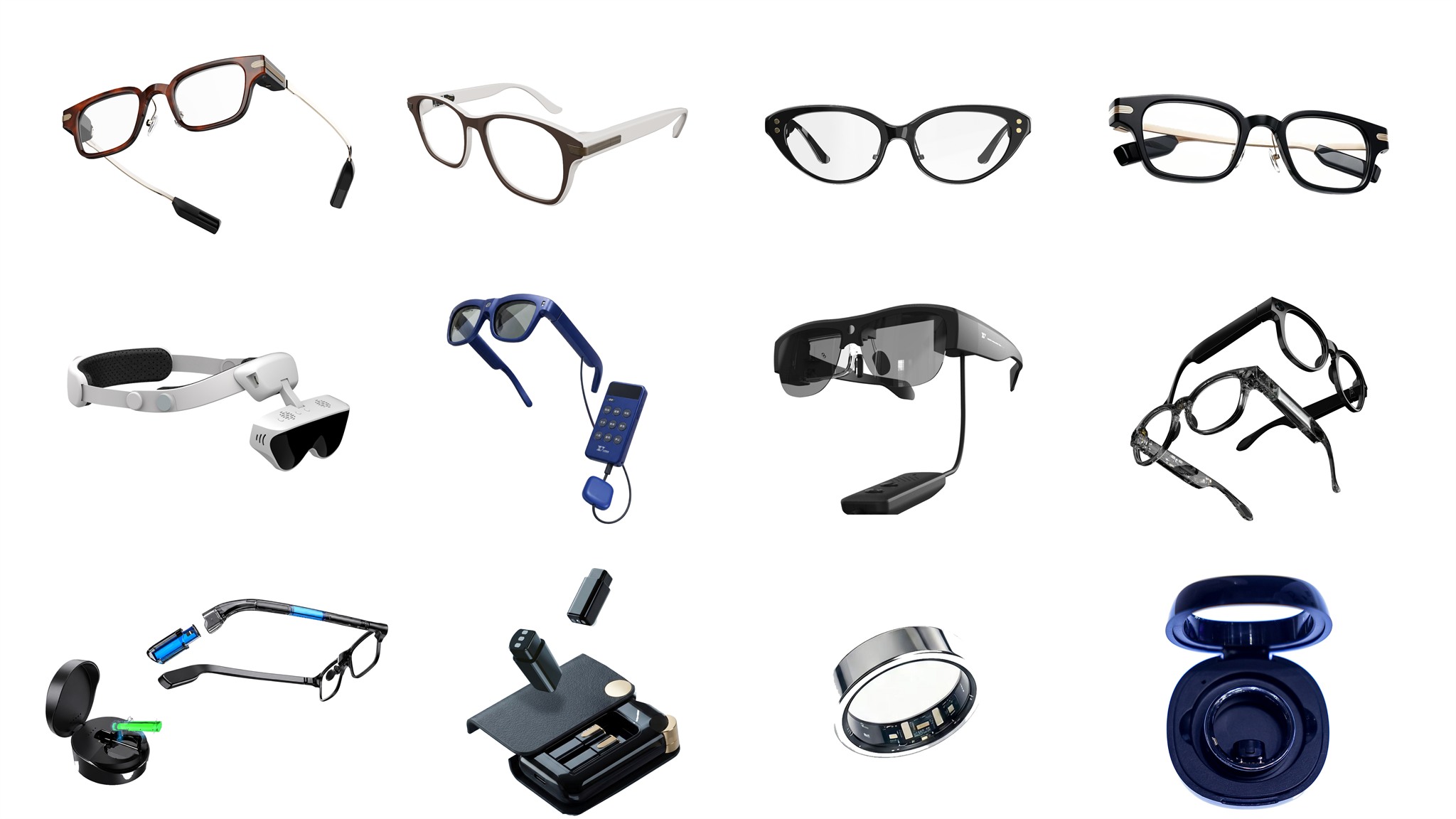
The portfolio is organized by buying logic instead of long technical paragraphs: camera and audio, AR display, camera plus AR, and specialist workflows for accessibility, field operation, clinical display or cue support.
For first-person recording, travel, sports, notes, object prompts and connected app workflows.
No-camera display hardware for notifications, prompts and app/phone/service-assisted content rendering.
For premium camera plus AR projects or field-operation deployments with strict compliance review.
For accessibility, professional channel pilots, enterprise audio and clinical display requirements.
Each row keeps the same information hierarchy: market role, hardware profile, display or camera boundary, software route and the next detail page.
| Platform | Best-fit project | Core hardware | Display / camera boundary | Integration route | Next step |
|---|---|---|---|---|---|
| K900 | AI camera and open-ear audio smart glasses | Sony 13MP camera, EIS, microphones, Bluetooth/Wi-Fi and app control | Camera and audio platform; no AR display | Partner app workflows, AI services where permitted, SDK discussion through RFQ | Open detail |
| AR99 | Lightweight monocular AR information display | Approx. 28g bare-device reference; magnesium-lithium alloy + TR90 with titanium-alloy hinge; 100 mAh reference battery; approx. 1-3 h functional use / 72+ h standby under reference conditions, with actual runtime varying by function, brightness, Bluetooth/app use, network, environment and battery condition; 0.12 cc Micro-LED optical-engine volume and VHG waveguide | No camera; right-eye monocular single-green, 30 deg FOV, 640 x 480 @ 30Hz, 1,500-nit reference peak in-eye brightness | Button + touch; Bluetooth + companion-app/phone/service-assisted prompts, notifications and partner content rendering | Open detail |
| AR99 Pro | No-camera pro AR display programs | SRG / 2D grating waveguide platform with hot-swappable temple batteries | No camera; pro display configuration | Display integration, app workflow and power-system project review | Open detail |
| C100 | Premium camera plus AR smart eyewear | 21MP capture, see-through AR display, MediaTek compute and hot-swappable power | Camera plus AR display platform | ODM/JDM programs with visual AI and app integration review | Open detail |
| Confidant | Assistive smart glasses for blind and low-vision users | Front camera, two front-facing obstacle sensors, GPS module/antenna and handheld controller | Scene descriptions and spoken Q&A; forward obstacle alerts; map-based route prompts; selected recognition tasks | User safety, consent, privacy and regional deployment validation; unstated hardware specifications require confirmation | Open detail |
| Falcon 007 Pro | Field-operation smart glasses | 1.3MP reference camera, HD near-eye display, Type-C linked compute and optional thermal module | First-person capture and project-gated recognition integration for approved field workflows | Regional, privacy, legal and customer review required for sensitive capture or recognition functions | Open detail |
| Audio 01 | Camera-free AI audio eyewear | Lightweight audio temples, microphones and user-replaceable power design | No camera and no display | Translate, interpret, transcribe and listening-assist app workflows | Open detail |
| Nudge | Behavior cue and focus-assist eyewear | Lightweight cue hardware and app-guided schedule logic | No camera; peripheral visual cue module | Professional-channel pilot, app schedule setup and compliance notes through RFQ | Open detail |
| BB Medical | Clinical display smart eyewear | Binocular Micro-OLED display headset with adjustable headband | 1920×1080 @ 60 Hz, 55° FOV; 205 g excluding data cable | Display source, adapter, intended use, validation and regulatory scope reviewed per project | Open detail |
Style and CMF variants stay inside their parent platform family, so the public matrix remains easy to compare across real hardware architectures.
For software access, SDK/API discussion, regional compliance, medical claims or custom optics, SmartXY reviews the target market and partner scope before confirming deliverables.
Frame styles and CMF options are presented inside their parent platform, keeping the portfolio easier for buyers to compare.
Camera, display, audio, cue and clinical-display capabilities are separated so partners can choose the right architecture quickly.
Partner app access, local software development, compliance packages and ODM/JDM requirements are handled through the RFQ form.